EVL - Control options
Right-click on any control for a collection of options:
edit
Presents a domain-phase view of the maturity values. See below.
copy
the name of the control to clipboard
copy path
the control, and its ancestors, to clipboard
full text
code and name of the control to clipboard
full path
all the rows, from root to me, into clipboard
description
a more extensive description, if available
close father
compact tree: father is closed
close brothers
compact tree: brothers are closed
go to …
for links,  , jump to the link destination
compensating control
adds or edits an alternative control
additional measures
adds or edits additional controls
Domain-phase view. Clicking on a control (right click > EDIT) you may have a one-control view of maturity values covering all the domains and all the phases
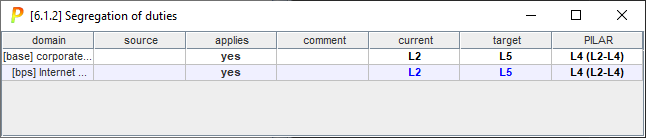
User values are in black over white; while calculated values are in cyan.
Created with the Personal Edition of HelpNDoc: Experience the Power and Ease of Use of HelpNDoc for CHM Help File Generation