License
When right-click on “license” box you are presented with the following options
license file
If you received a LIC file, choose it!
evaluation license
You may auto-generate a temporary evaluation license for 30 days.
On the license selection screen
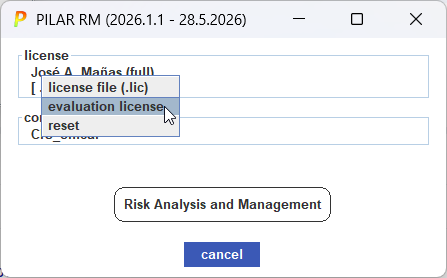
right click on license box, and select EVALUATION LICENSE
reset
Select this option for PILAR to forget last selection and restart license validation.
A license is a text file that you receive to enable the tool.
Without a license, PILAR permits reading projects, but writing is forbidden.
Licenses work dynamically, "registering" a computer for a 24h period..
Licenses allow for one or more simultaneous users to use the tool.
Each user receives a lease for 24h.
Trying to use the license for more than specified users rises an error.
Users are freed after 24h, and the license may be assigned to another computer.
Created with the Personal Edition of HelpNDoc: Streamline your documentation process with HelpNDoc's WinHelp HLP to CHM conversion feature