Reference and target phases
The traffic light gives a fast indication on whether the level of maturity is enough or not.
To calculate the colour of the light, PILAR uses 2 references:
GREEN: target maturity
- click the right button at the header of the phase to use as target
the head of the selected column is painted GREEN
RED: assessed maturity
- click on the header of the phase you want to evaluate
the header of the selected phase becomes RED
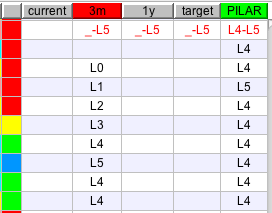
Using the above information, PILAR chooses a colour:
|
traffic light colour code |
|
|
BLUE |
if the maturity at the RED phase is higher than the maturity at the GREEN phase |
|
GREEN |
RED maturity is aligned with target |
|
YELLOW |
the RED maturity is poor: should be enhanced |
|
RED |
the RED maturity is too poor: must be enhanced |
|
GREY |
if the safeguard does not apply |
|
Here you have an example.
|
|
Created with the Personal Edition of HelpNDoc: Free EPub producer