installation / installations
Installation copies PILAR files into a directory that
- is called according to the installed tool and version
- contains ALL the information to execute
This single-directory structure allows for several versions to be available simultaneously, and permits to make a backup copies to recover in the fure tha version used for an old project: just ZIP the directory, and backup the zip file.
This a typical installation of PILAR in a directory where the user has access rights

In this example,
- pilar_rm.exe is the executable
- CIS_en.car is the configuration file
You may install several configurations in the same directory

In this example,
- pilar_rm.exe is the executable
- CIS_en.car is the configuration file (English)
- STIC_es is the Spanish configuration file
You may aggregate as many configurations as needed using a single executable in a single directory.
You may also install several versions in separate directories
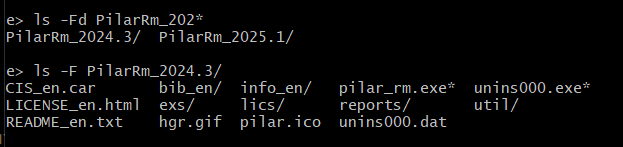
to execute PILAR, choose the appropriate EXE file for the needed SW version, and the appropriate configuration file.
Created with the Personal Edition of HelpNDoc: Transform Your CHM Help File Creation Process with HelpNDoc